
When should you use Qnet, TCP/IP, or NFS?
In your network design, when should you use Qnet, TCP/IP, or NFS? The decision depends on what your intended application is and what machines you need to connect.
The advantage of using Qnet is that it lets you build a truly distributed processing system with incredible scalability. For many applications, it could be a benefit to be able to share resources among your application systems (nodes). Qnet implements a native network protocol to build this distributed processing system.
The basic purpose of Qnet is to extend QNX Neutrino message passing to work over a network link. It lets these machines share all their resources with little overhead. A Qnet network is a trusted environment where resources are tightly integrated, and remote manager processes can be accessed transparently. For example, with Qnet, you can use the QNX Neutrino utilities (cp, mv and so on) to manipulate files anywhere on the Qnet network as if they were on your machine. Because it's meant for a group of trusted machines (such as you'd find in an embedded system), Qnet doesn't do any authentication of remote requests. Also, the application really doesn't know whether it's accessing a resource on a remote system; and most importantly, the application doesn't need any special code to handle this capability.
If you're developing a system that requires remote procedure calling (RPC),
or remote file access, Qnet provides this capability transparently. In fact,
you use a form of remote procedure call (a QNX Neutrino message pass) every time you
access a manager on your QNX Neutrino system. Since Qnet creates an environment where
there's no difference between accessing a manager locally or remotely, remote
procedure calling (capability) is builtin. You don't need to write source
code to distribute your services. Also, since you are sharing the filesystem
between systems, there's no need for NFS to access files
on other QNX Neutrino hosts (of the same endian), because you can
access remote filesystem managers the same way you access your local one. Files
are protected by the normal permissions that apply to users and groups
(see
File ownership and permissions
in the Working with Files chapter in the User's Guide).
There are several ways to control access to a Qnet node, if required:
- Bind Qnet to a specific network interface; this ensures that the protocol functions only on that specific interface.
- Use maproot and mapany options to control—in a limited way—what other users can do on your system.
- Use a static list of your peer systems instead of dynamically discovering them.
You can also configure Qnet to be used on a local LAN, or routed over to a WAN if necessary (encapsulated in the IP protocol).
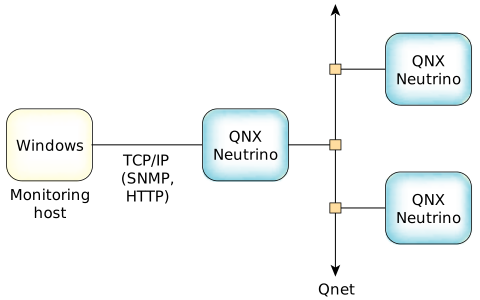
Another issue may be the required behavior. For example,
NFS has been designed for filesystem operations between all hosts and all
endians. It's widely supported and a connectionless protocol. In NFS, the
server can be shut down and restarted, and the client resumes
automatically. NFS also uses authentication and controls directory
access. However, NFS retries forever to reach a remote host if
it doesn't respond, whereas Qnet can return an error if connectivity
is lost to a remote host. For more information, see
NFS filesystem
in Working with Filesystems in the User's Guide).
If you require broadcast or multicast services, you need to look at TCP/IP functionalities, because Qnet is based on QNX Neutrino message passing, and has no concept of broadcasting or multicasting.