
Methods of building a QNX hypervisor system
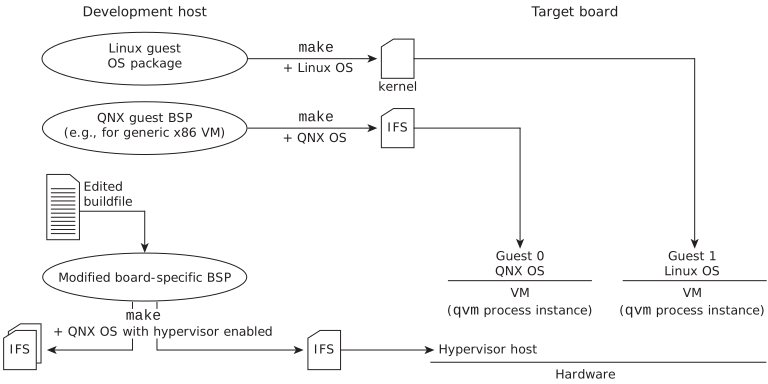
You build a QNX hypervisor system by first building the guest OS images, then adding the hypervisor components to your QNX OS system (if necessary), and then building the host image. You can use the files in a BSP along with the make utility or use the QNX OS image generator for this work.
Building a hypervisor system based on a BSP
QNX provides some BSPs that contain a hypervisor variant of the buildfile that you can use to build your hypervisor host image using a specific make command as described below. The release notes for both QNX Hypervisor and QNX Hypervisor for Safety list the supported target platforms, which are usually the same ones for which QNX supplies such BSPs. But note that these BSPs are released independently of the hypervisor product; for information on where to find these BSPs, see the release notes for your QNX Hypervisor product.
If there is no QNX-supplied BSP that contains a hypervisor buildfile variant and is compatible with your target hardware, you must modify one of the buildfiles that comes with the BSP that supports your hardware to include the hypervisor components.
Building the hostsection provides detailed instructions for each of these cases. Here, we outline the overall build process, which is:
- Configure the proper environments for building the hypervisor host and any guests you plan to build.
- Build the guest OS images. If your project includes the guest-supporting content (e.g, IFS, VM configuration files) in the host IFS, this content has to be available before you build the host IFS. Even if this content is stored on a system disk instead, QNX recommends that you create the guest first.
- If your BSP does not already support QNX Hypervisor or QNX Hypervisor for Safety, add the hypervisor components to the buildfile. These components include the qvm* binaries needed for the target platform, the vdev-*.so files, and one or more VM configuration (*.qvmconf) files, and if they're available, the smmuman binary and its supporting libraries and configuration files.
- Build the host IFS.
If you use the hypervisor variant buildfile that your QNX hypervisor product provides, you must build the host IFS with the command make hyp.
- If it's applicable in your environment, build a bootable disk image. QNX-supplied BSPs that support QNX Hypervisor or QNX Hypervisor for Safety include the disk image as a target. For other BSPs, you can add disk image building functionality if needed.
- If you're using a disk image for your system, transfer it to the target hardware board. Otherwise, transfer your host IFS to the board.
Using mkqnximage to build a QNX hypervisor system
You can use the mkqnximage QNX OS virtual machine image generator to build a QNX hypervisor system, which can be useful for both demonstration and development purposes.
Make sure that you have installed the QNX SDP virtualization drivers (these drivers are included by default when you install QNX Hypervisor or QNX Hypervisor for Safety).
- To build the guest OS, run mkqnximage with the options that are
appropriate for your project and specify qvm as the type
(i.e.,
--type=qvm). - To build the host OS, in a separate directory from where you built the guest OS, run mkqnximage with the --qvm and --guest options. For example:
where --guest specifies a directory in which you ran mkqnximage to build a guest image. This option works only for guests that were created using mkqnximage.mkqnximage --qvm=yes --guest=path_to_guestYou can use mkqnximage snippet files to include additional guests or ones other than those generated by mkqnximage (e.g, update local/data_files.custom to include the required files).
- Use one or both of the following methods to test your hypervisor system:
- For a basic test as to whether your hypervisor system works, after it has booted, run qvm-check.
- Examine the /proc/config contents for details about the
status of the hypervisor on the host system.
For example, to display just the status of the hypervisor:
(You can use cat to display the full contents of /proc/config.)# grep virtualization /proc/config virtualization:enabled
- If you used --guest to include a guest, you can use the script /data/hypervisor/start_guest to start it.