
About QNX Containers
QNX Containers has the following three components:
- QNX Container Runtime (qrunc)
- QNX Container Manager (qcmgr)
- QNX Container Manager Client Utility (qcmctl)
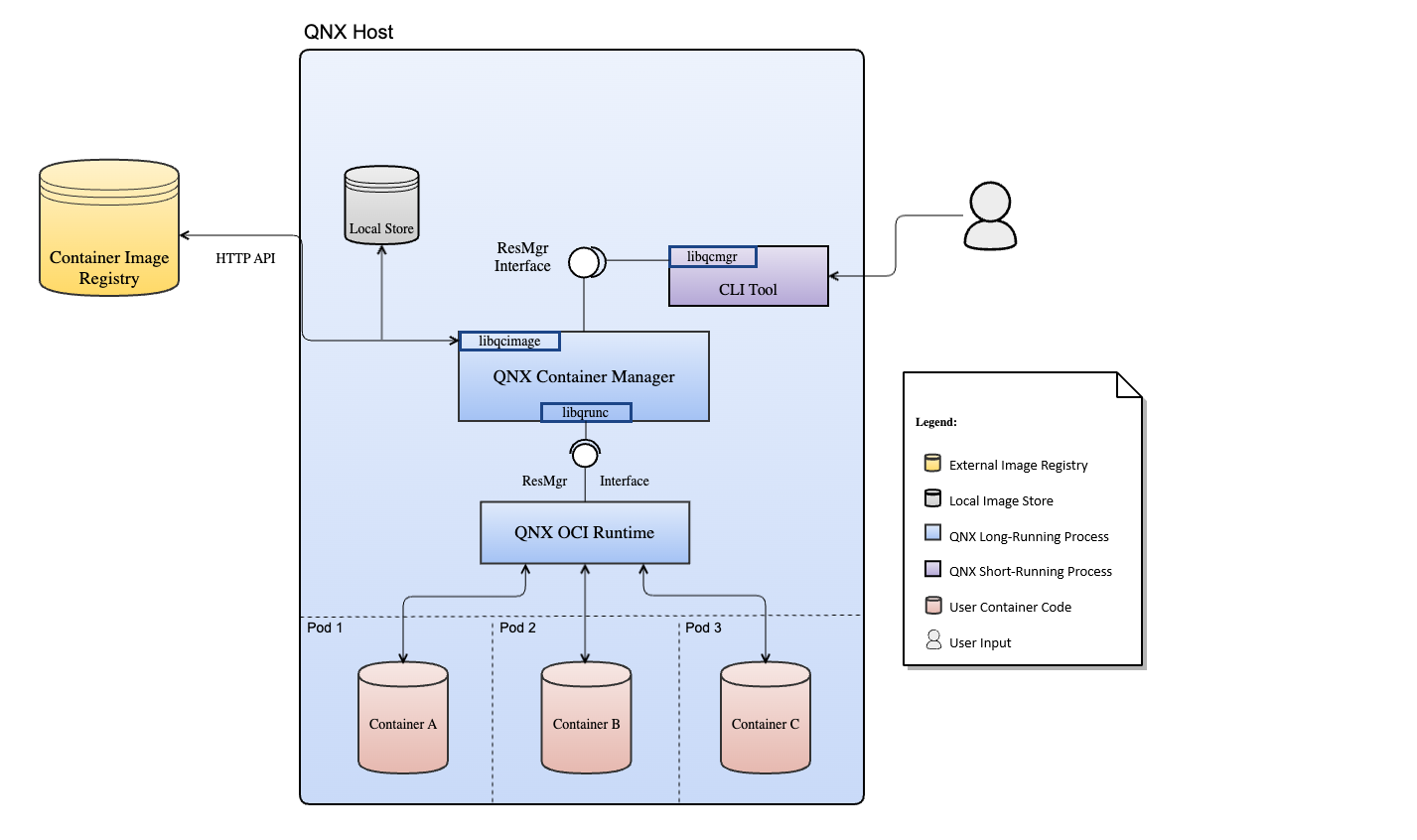
The following diagram illustrates how the user
uses qcmctl to communcicate with qcmgr,
qcmgr interacts with the registry and qrunc,
and qrunc monitors the container processes.
QNX Container Runtime, qrunc
QNX Container Runtime (qrunc) is a low-level Open Container Initiative (OCI) compliant runtime that's responsible for the runtime management of all containers. A single instance of qrunc is instantiated on the system.
The qrunc process is responsible for creating
and deleting the container environment within the QNX host.
Its responsiblilities include the following tasks:
- Setting up file system isolation
- Setting up CPU and memory isolation
- Launching and monitoring container processes
- Handling container process logging
- Handling exec and attach requests
- Stopping container processes and cleaning up resources
Note:
Container processes have restrictions as defined by the container definition in which they live.
However, each version of QNX Containers may have additional or modified restrictions that are defined in the product release notes.
Always check the QNX Containers release notes for details on supported restrictions.
QNX Container Manager, qcmgr
The main component, QNX Container Manager (qcmgr), is a high-level container runtime that manages the containers on a QNX host.
There is a single instance of this program running and it operates with the following responsibilities:
- Listen and act on control messages from QNX Container Manager Client Utility (qcmctl)
- Interact with the image library for container image management
- Set up the network environment based on pod configuration
- Interact with the qrunc component for container runtime management
QNX Container Manager Client Utility, qcmctl
The command-line tool, QNX Container Manager Client Utility (qcmctl), communicates with the qcmgr to control image, pod, and container functionality.
Workflow
The workflow involved in using QNX Containers:
- Build a QNX Container image
- Make the image available to a QNX target, by:
- pushing the image to a remote or local registry, or
- saving the image as a tar file and copying the file to the target
- Retrieve a container image, by:
- pulling the image from a registry, or
- importing an image from a tar file
- Create a pod
- Create a container
- Start the QNX Container processes
- Execute commands in the container environment
Page updated: