
Components of the SAT
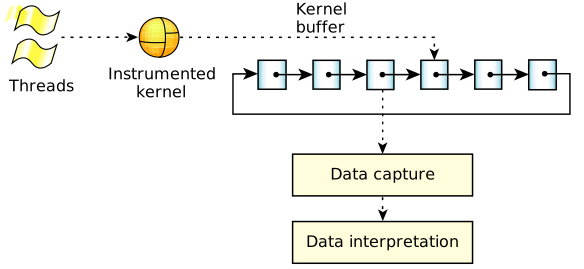
The QNX OS System Analysis Toolkit (SAT) consists of the following main components:
- instrumented kernel
- kernel buffer space
- data-capture program (tracelogger)
- data interpretor (traceprinter)
You can also trace and analyze events under control of the Integrated Development Environment (IDE).
Instrumented kernel
The QNX OS instrumented kernel includes a small, highly efficient event-gathering module. As threads run, this kernel module continuously intercepts information about what the kernel is doing, generating timestamped and CPU-stamped events that are then stored in buffers. Because the tracing occurs at the kernel level, the SAT can track the performance of all processes, including the data-capture program.
Kernel buffer space
The kernel buffer space is composed of many small trace buffers. Although the total number of buffers is limited only by the amount of system memory, this space must nonetheless be managed carefully. If all of the events are being traced on an active system, the number of events will be quite large.
To allow the kernel to write to one part of the kernel buffer space and store data in another part of it simultaneously, the trace buffers are organized as rings, with one ring for each CPU. Whenever a buffer in a particular ring becomes completely full, the kernel requests that the data-capture program flush the buffer. A waiting worker thread in this program then retrieves the buffer contents and saves them in a location for offline processing, or passes these contents to a data interpreter for runtime analysis. In either case, the buffer space gets emptied and becomes available again for use by the kernel.
Data-capture program (tracelogger)
The QNX OS includes a utility, tracelogger, that you can use to capture data. This service interacts with the instrumented kernel to configure the number of buffers it uses to store trace data and to receive events so it can save them in a file or send them to a device for later analysis.
Because the tracelogger may write data at rates well in excess of 20 MB/minute, running it for prolonged periods or running it repeatedly can use up a large amount of space. If disk space is low, erase old log files regularly. (In its default mode, tracelogger overwrites its previous default file.)
- create internal trace buffers
- set up filters
- control the tracing process
- insert user-defined events
For more information, see the
Capturing Trace Data
chapter in this guide, the entry for
tracelogger
in the Utilities Reference, and the entry for
TraceEvent()
in the C Library Reference.
Data interpretor (traceprinter)
- perform analysis
- display results
- debug applications
- create a self-monitoring system
- show events ordered by process or by thread
- show thread states and transitions
- show currently running threads
- set up callback functions and associations for each event
- retrieve header and system information from the trace event file
- debug and control the parsing process
For more information, see the
Interpreting Trace Data
chapter in this guide, as well as the entry for
traceprinter
in the Utilities Reference.
Integrated Development Environment (IDE)
The QNX Momentics IDE provides a graphical interface for
capturing and examining trace events.
The IDE lets you filter events, zoom in on ranges of them, examine their data,
save subsets of events, and more.
For details, see the
Analyzing System Behavior
chapter of the IDE User's Guide.