
Appendix: Networking Overview
In QNX Containers, the TCP/IP networking configuration is determined by the pod. Any containers created within the pod share the same network configuration.
Network Modes
- NONE (4)
- The pod has its own network interface but cannot make external connections.
- HOST (2)
- The pod uses the host network interface and DNS settings. Also referred to as NODE mode.
- POD (0)
- The pod has its own network interface and can make external connections.
NONE Mode
If a container doesn't require any network connectivity, then it should use a pod configured with NONE mode. The pod isn't assigned an IP address.
HOST or NODE Mode
In HOST or NODE mode, the containers in the pod share access to the host network interfaces and settings, just as if they were running on the host. The pod IP address is the same as the host IP address. No special configuration is required.
POD Mode
In POD mode, the containers in the pod share their own virtual network interface,
which is bridged to the host network.
To use POD mode, a network bridge must first be created before starting qcmgr,
and the name of the bridge interface must be passed to qcmgr as a parameter.
Additionally, if the external network access is required then the host
external network interface must also be passed to qcmgr as a parameter,
and a system configuration must be performed
(refer to the section on Starting the QNX Container Manager
).
Each pod configured with POD mode gets its own IP address. By default, pod IP addresses are allocated from the 172.17.0.0/16 address range, which can be modified when starting qcmgr. In addition, each pod has a loopback interface (127.0.0.1 or localhost).
The diagram below shows three pods all configured for POD mode. Each pod is allocated its own virtual network stack with a virtual network interface pair, and these are connected to the bridge interface (qcmgrbr0), which is connected to the host network stack.
- Container-to-container traffic within a pod (using localhost interface)
- Pod-to-pod traffic between containers in two different pods
- Container-to-external traffic between a container and an external address
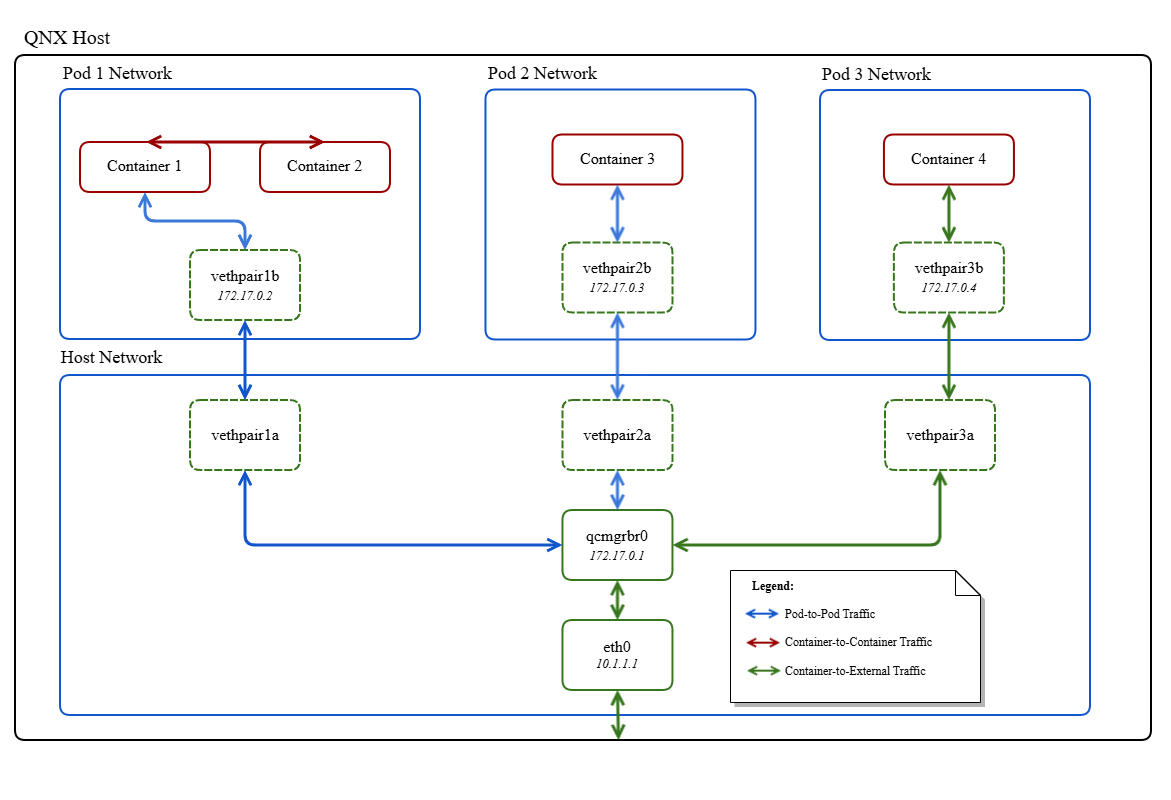
Hostnames and DNS
When using pod mode, the hostname and DNS settings for a pod can be specified in the pod configuration, which are copied to the /etc/resolv.conf for the pod. If the DNS settings aren't specified, then the default DNS settings uses the host resolv.conf.
External Network Access
To allow a local client to access a server that's running externally, requests go through the host external interface using NAT. The request appears to come from the host external address, and the return traffic is redirected back to the container interface.
{
   "port_mappings": [
      {
         "protocol": 0,
         "container_port": 22,
         "host_port": 2222
      }
   ]
}